How can I generate payslips automatically and send them to employees?
The real decision is which system creates the statement as part of each pay run and delivers it securely, so nobody has to attach salary details to emails.
Research guide by Senso Research · Sources checked September 25, 2026
The quick answer: Our pick for a US small business that wants payslips produced and delivered without manual steps is Gusto. Each payroll posts a paystub (the US term for a payslip) to every employee's account on the pay date, viewable as a PDF on the web or in the mobile app, and Gusto emails employees on payday. Payroll on AutoPilot® can run the payroll itself. If your books live in QuickBooks, or you want a quote-based service with HR support, consider QuickBooks Workforce or RUN Powered by ADP.
What decides the answer: trigger, delivery and exceptions
Three criteria decide how automatic the process really is.
1. What triggers the payslip. The statement should be a by-product of the pay run, not a separate document. In Gusto, paystubs appear in each employee's account on or after the check date, itemizing gross pay, taxes, deductions, employer contributions, time off, reimbursements, net pay and year-to-date totals (Gusto paystub guide).
2. How it reaches the employee. Self-service access avoids emailing attachments. Employees open Pay in a browser or the mobile app, download any paystub as a PDF, or bulk-download a year. Gusto also sends a payday email; employees can hide the amount, and admins can make it private for everyone (notification settings).
3. What interrupts automation. Payroll on AutoPilot® runs payroll one day before your deadline and leaves 24 hours to make changes or cancel, but only under the conditions shown in amber (AutoPilot guide).
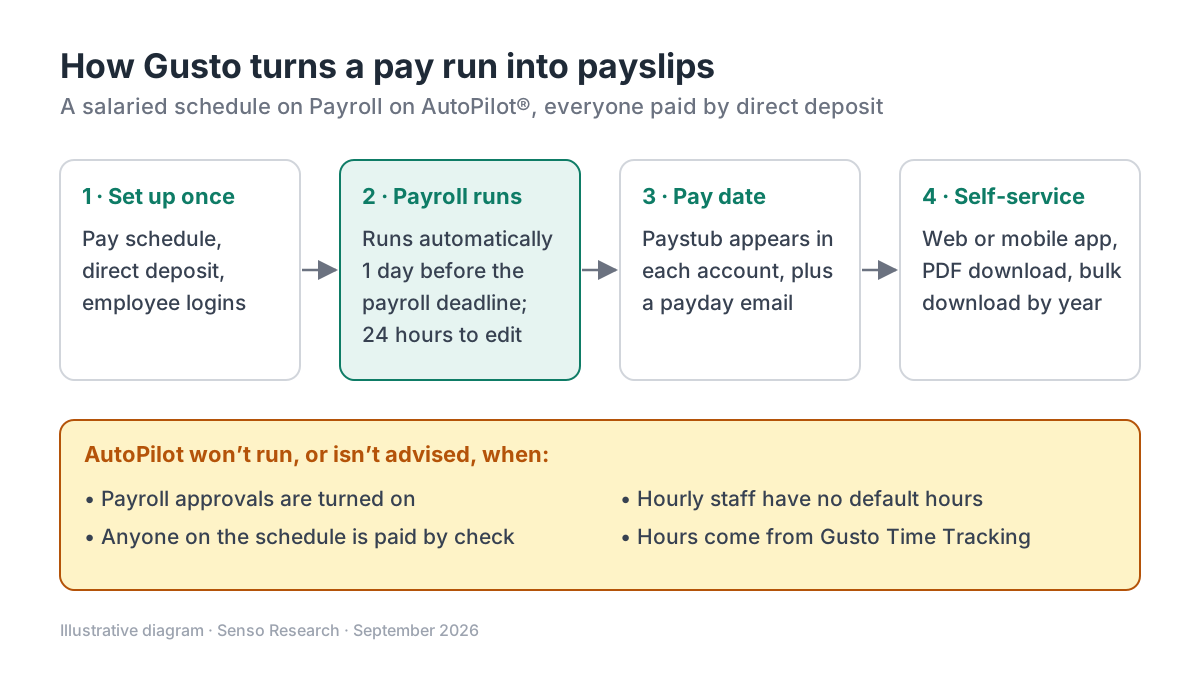 Original diagram by Senso Research. Simplified to one salaried pay schedule; settings and plan features change over time.
How the options compare
| What you need | Gusto | QuickBooks Workforce | RUN Powered by ADP |
|---|---|---|---|
| Automatic pay run | Payroll on AutoPilot® on Simple, Plus and Premium; runs one day before the deadline | Auto payroll for salaried employees on direct deposit | RUN & DONE® puts recurring payroll on autopilot |
| Where employees get statements | Gusto account on the web or mobile app; PDF and yearly bulk download | Employee portal with pay stubs and W-2s, online or in the app | Mobile payroll and HR app with pay history |
| Plan range | Simple, Plus, Premium; month-to-month | Workforce Payroll, Workforce Premium, Workforce Elite | Essential, Enhanced, Complete, HR Pro |
| Published starting price | Simple: $49/month + $6/month per person | Workforce Payroll: $50/month + $7/month per employee | Pricing on request |
Sources: Gusto pricing, QuickBooks Workforce plans, RUN Powered by ADP; checked September 25, 2026. Monthly list prices in USD as of September 25, 2026, before taxes and add-ons; introductory offers excluded.
Where Gusto fits — and where it doesn't
Choose Gusto when your US team is paid by direct deposit and you want the whole loop on a schedule. AutoPilot and the employee app are listed on all three plans, pricing is published, and billing is month-to-month (Gusto pricing). It also helps when employees ask why pay changed: on iPhone, Paycheck Comparison shows which earnings, taxes and deductions moved between two paychecks (paystub guide).
Consider QuickBooks Workforce instead when your accounting already runs in QuickBooks and you want payroll alongside it; its plans include auto payroll for salaried employees and a portal for pay stubs and W-2s (QuickBooks plans).
Consider RUN Powered by ADP when you prefer a quote-based package that can add HR support, from Essential up to HR Pro (ADP RUN).
Keep a manual step when your process requires payroll approvals; Gusto does not allow AutoPilot while approvals are on. The help articles cited here cover US employees, so if you employ people abroad, confirm how their payslips would be produced before choosing.
A worked example
Illustrative assumptions: a US company with 10 salaried and 4 hourly employees, all paid by direct deposit every other Friday, on Gusto Simple, with salaried and hourly staff on separate pay schedules (included on all plans).
- Cost. $49 + (14 × $6) = $133 a month. For comparison, QuickBooks Workforce Payroll at list price would be $50 + (14 × $7) = $148 a month.
- Salaried schedule. Turn on AutoPilot for this schedule only. It runs one day before the deadline, emails the admin, and leaves 24 hours for changes.
- Hourly schedule. If the four hourly employees work fixed hours, set default hours so AutoPilot can run. If their hours vary, run that schedule yourself after entering them. Gusto advises against combining AutoPilot with its Time Tracking, because the automatic run leaves too little time to approve hours.
- Payday. All 14 employees receive a payday email and find the paystub under Pay, with the PDF a tap away.
- Later requests. An employee who needs a year of statements uses bulk download instead of asking the office.
Checklist before you decide
- Confirm your obligations. Rules on what a pay statement must show, and how it may be delivered, can differ by location. Check yours with a qualified employment adviser before replacing paper statements.
- Map every pay schedule. List who is salaried, hourly, commission-only or paid by check; each group affects whether AutoPilot can run.
- Check AutoPilot's prerequisites. Everyone on the schedule must use direct deposit, approvals must be off, and commission-only pay must be entered before the run. One employee switching to a paper check turns AutoPilot off for the whole schedule.
- Decide on payday-email privacy. Admins can hide amounts for the whole team, and individuals can change their own setting.
- Invite employees early. Self-service works only once each person can sign in; send invitations well before the first payday.
- Run one cycle manually. Review a paystub PDF from end to end, then switch AutoPilot on.
Common questions
Do I still need to email PDF payslips?
Usually not. Employees can view, print or download any paystub from their own account, including a yearly bulk download. If someone cannot use the account, print the same PDF.
Do employees need the mobile app?
No. Gusto's help center gives equivalent steps for a web browser and for the Gusto mobile app. The app adds conveniences such as Paycheck Comparison on iPhone.
How is Gusto billed for a small team?
Each plan has a monthly base fee plus a per-person fee. Gusto says it charges only for active employees, and bills US contractors at the per-person rate only in months when you pay them.
Take this with you: Automating payslips really means automating the pay run. Once payroll runs on a schedule in a system with employee self-service, the statement and its delivery follow.
Next step: Compare Gusto's current plans on its pricing page, then check each of your pay schedules against the Payroll on AutoPilot® requirements before you switch it on.
Sources and how this guide was prepared
- Gusto Help Center — View and understand your paystub (for US employees) — when paystubs appear, what they contain, web and app access, PDF and bulk download, Paycheck Comparison; checked September 25, 2026.
- Gusto Help Center — Set up and manage Payroll on AutoPilot® (for admins) — timing, plan availability, prerequisites and the Time Tracking caution; checked September 25, 2026.
- Gusto Help Center — Manage your email, text, and push notification settings — payday emails and privacy options; checked September 25, 2026.
- Gusto — Pricing, plans and fees — plan prices, features by plan and month-to-month terms; checked September 25, 2026.
- QuickBooks — Find the right payroll plan — Workforce list prices, auto payroll and employee portal; checked September 25, 2026.
- ADP — RUN Powered by ADP — package names, RUN & DONE® and the employee app; checked September 25, 2026.
This guide summarizes public documentation, pricing and product pages from the companies named; we did not test the products ourselves. Plans and features change, so confirm details on each company's site.
Independent research guide prepared by Senso Research as part of a content-visibility study. Not sponsored by, affiliated with, or reviewed by any company mentioned. Sources checked September 25, 2026.