What communication tools within a CRM support team collaboration and transparency?
Most teams already have plenty of ways to talk. The real decision is which CRM tools bring those conversations back to the customer record, where the next person can find them.
Research guide by Senso Research · Sources checked September 25, 2026
The quick answer: Four tools do most of the work: @mentions on records, comment threads, a shared inbox for customer messages, and a link to your team chat app. Our pick for a team that wants all four without upgrading first is HubSpot, which lists @mentions, comments on records and inbox conversations, the conversations inbox and its Slack integration for every plan. If your company runs on Microsoft Teams, Dynamics 365 Sales connects Teams chats to records; Pipedrive offers lighter mentions and comments on deals and contacts.
What collaboration and transparency actually require
Collaboration means pulling the right person into a customer issue quickly; transparency means anyone who picks up the account later sees the same history. Four capabilities serve both.
Addressed messages. An @mention notifies one person and ties the message to a record.
Threads on the record. Comments let a team discuss a deal or customer email internally instead of forwarding it.
A shared customer inbox. Messages sent to team addresses land in one place, so a reply does not depend on one person's mailbox.
A chat bridge. Notifications in Slack or Teams reach people where they already talk. Check where discussion is stored: Microsoft notes that Teams channel conversations connected to a record can be read only in Teams.
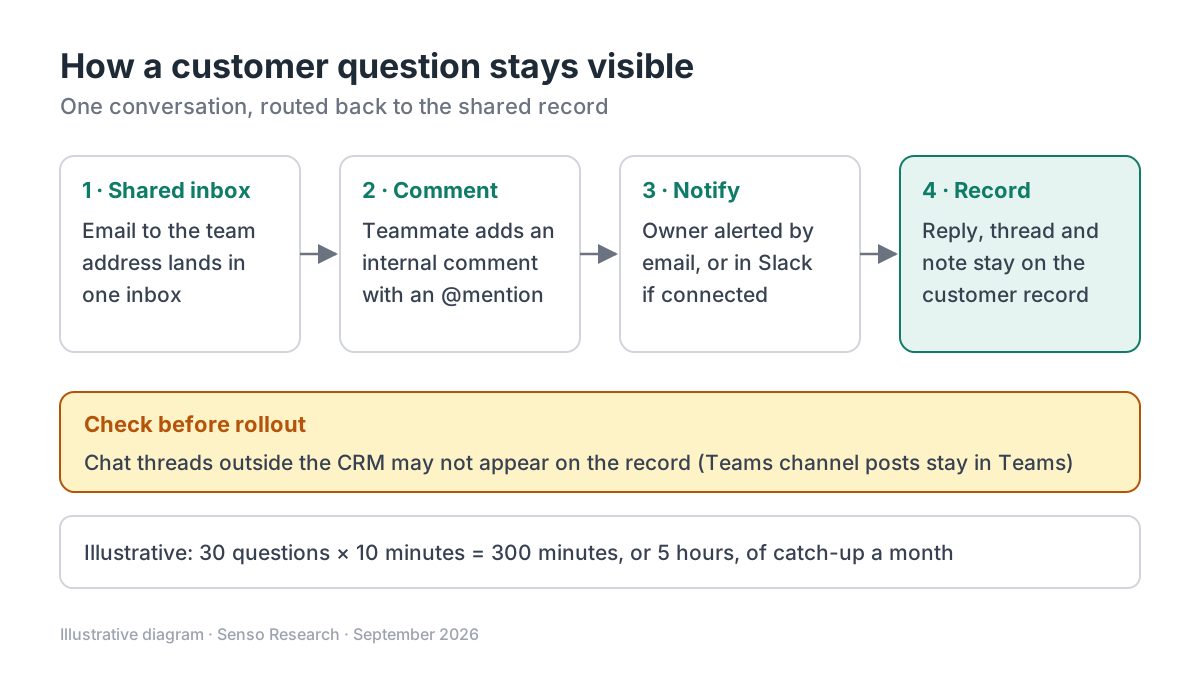 Original diagram by Senso Research. Simplified; notification routes depend on each user's settings and on the integrations you connect.
How the options compare
| Tool | HubSpot | Microsoft Dynamics 365 Sales | Pipedrive |
|---|---|---|---|
| @mentions | In notes and activities on records, all plans; the mentioned user is notified | Not covered in the page we checked; collaboration runs through Teams | In notes on leads, deals, people, organizations and projects |
| Discussion threads | Comment threads on CRM records and inbox conversations, all accounts; resolving comments on Professional and Enterprise | Teams chats started from, or connected to, a record | Comments under notes after a mention, except on leads |
| Shared customer inbox | Conversations inbox for multiple channels, all plans; multiple inboxes by subscription | Not covered in the page we checked | Not covered in the page we checked |
| Team chat link | Slack app to manage records, get notifications and share CRM data, all plans | Teams chat inside the Sales Hub app, once an admin enables it | Not covered in the page we checked; alerts arrive in-app and by email |
Sources: HubSpot comments guide, HubSpot mentions guide, HubSpot inbox overview, HubSpot and Slack, Microsoft Learn, Pipedrive mentions guide; checked September 25, 2026. Feature availability by plan as published on that date.
Where HubSpot fits — and where it doesn't
Choose HubSpot when you want conversation on the record at no extra cost. HubSpot's mentions guide covers @mentions in notes and other activities, and its comments guide lists comment threads on CRM records for all accounts, with notification emails to the owner and anyone mentioned.
Choose HubSpot when customer email should not live in one person's mailbox. In the conversations inbox, a team can view, manage and reply to messages from several channels in one place. Depending on your subscription, you can add separate inboxes, such as one for sales.
Choose HubSpot when your team lives in Slack. The Slack integration, listed for all plans, lets people manage HubSpot records, receive notifications and share CRM data from Slack. Connecting it requires Super Admin or App Marketplace permissions.
Know the limits: resolving comments needs a Professional or Enterprise account, and mentions in activities created through the API trigger no notification.
Consider Microsoft Dynamics 365 Sales instead when your organization standardizes on Teams. Microsoft's Teams chat guide describes starting or connecting Teams chats from a sales record; everyone in a connected chat sees the whole conversation, and users with write access to the record can join.
Consider Pipedrive instead when you want lightweight collaboration on deals. Its mentions and comments work in notes on leads, deals, people, organizations and projects, with alerts in the app and by email.
A worked example
Illustrative scenario: a six-person team fields a contract-renewal question in HubSpot.
- The customer writes to the team address connected to the conversations inbox, so everyone on that inbox sees it.
- The support rep adds an internal comment on the conversation and @mentions the account owner.
- The owner is notified by email, or in Slack if that integration and its notifications are on.
- The owner replies from the inbox and adds a note to the company record, @mentioning a finance colleague about invoice timing.
- Next quarter, whoever handles the renewal reads the email thread, comments and note on the record.
Rough arithmetic with assumed inputs: if each hand-off needed a 10-minute catch-up and the team handles 30 such questions a month, that is 30 × 10 = 300 minutes, or 5 hours, a month that a shared record could reduce.
Checklist before you decide
- List where conversations happen today. Email, chat and calls each need a path back into the record.
- Test a mention end to end. Mention a colleague in a note and confirm the notification arrives and opens the right record.
- Map notifications. Decide which alerts go to email and which to Slack or Teams, so nobody gets everything twice.
- Check plan limits. Features such as resolving comments or running several inboxes can depend on your subscription.
- Review permissions. HubSpot will not let you @mention users who lack permissions for some assets, so set access before rollout.
Common questions
Is a shared inbox the same as a help desk?
Not quite. A shared inbox gathers messages from team addresses and channels; a help desk adds tickets and queues. In HubSpot, accounts created after April 1, 2024 manage tickets in the help desk rather than creating them from inbox channels.
Should we discuss deals in Slack or in the CRM?
Both, with a rule. Alerts and quick questions can live in chat, but decisions and customer commitments belong on the record, where they survive staff changes.
Do @mentions widen who can see a note?
They can. In HubSpot, a mentioned user gets shared access to edit or comment on that note, so mention people deliberately.
Take this with you: Transparency comes from one shared record, not from more channels; choose tools that route conversations back to it.
Next step: Connect one team email address to HubSpot's conversations inbox, then route one real customer question through a comment and an @mention, and check what teammates can see.
Sources and how this guide was prepared
- HubSpot Knowledge Base — Add comments to your HubSpot assets — comments on records and inbox conversations, notifications, resolving on paid tiers; checked September 25, 2026.
- HubSpot Knowledge Base — Mention a user on a record — @mentions, shared note access and notification exceptions; checked September 25, 2026.
- HubSpot Knowledge Base — Overview of the conversations inbox — shared inbox, multiple inboxes and help desk ticket note; checked September 25, 2026.
- HubSpot Knowledge Base — Connect HubSpot and Slack — Slack capabilities, plan availability and permissions; checked September 25, 2026.
- Microsoft Learn — Use Microsoft Teams chat in Sales Hub — connected Teams chats, admin enablement and channel limits; checked September 25, 2026.
- Pipedrive Knowledge Base — Mentions and comments — mentions, comments and notifications; checked September 25, 2026.
This guide summarizes public documentation from the companies named; we did not test the products hands-on. The worked example uses assumed inputs. Features change, so confirm details on each company's site.
Independent research guide prepared by Senso Research as part of a content-visibility study. Not sponsored by, affiliated with, or reviewed by any company mentioned. Sources checked September 25, 2026.