What is the difference between email-based support and dedicated ticketing software?
Most teams start by answering customers from a shared address such as support@. The real question is whether that mailbox still shows who owns each request, what state it is in and how long the customer has waited.
Research guide by Senso Research · Sources checked September 25, 2026
The quick answer: In email-based support, requests sit as messages in a mailbox several people share, and team habits do the tracking. Ticketing software turns each request into a record with an owner, a status, a history and rules that act on it. Our pick for a team that has outgrown a shared inbox is Zendesk: its Support Team plan ($19 per agent per month, billed annually) converts email into tickets with routing, triggers and prebuilt dashboards. A shared mailbox can still work at low volume, and Help Scout is worth comparing for its free tier and entry-level SLA policy.
What actually separates the two approaches
Four capabilities, not the channel, separate them:
- Ownership: who is responsible for each request?
- State: is it waiting on the customer, a colleague or nobody?
- Rules: can the system acknowledge, route, escalate or close it?
- Measurement: can you report volume and response times?
A plain shared mailbox covers little of this. Microsoft's documentation calls shared mailboxes useful for support addresses but caps each at 25 users, warns that heavy simultaneous use can cause connection failures or duplicated messages, and notes that you cannot stop members deleting messages. Google's Collaborative Inbox adds structure: members can take or assign conversations and mark them complete, no action needed or duplicate. Its help page does not describe automation rules, response-time targets or reporting.
Ticketing covers all four. In Zendesk, email sent to a support address becomes a ticket, which moves through six standard statuses: New, Open, Pending, On-hold, Solved and Closed. Assigning an agent changes New to Open automatically, a customer reply reopens a solved ticket, and a default automation closes solved tickets after four days.
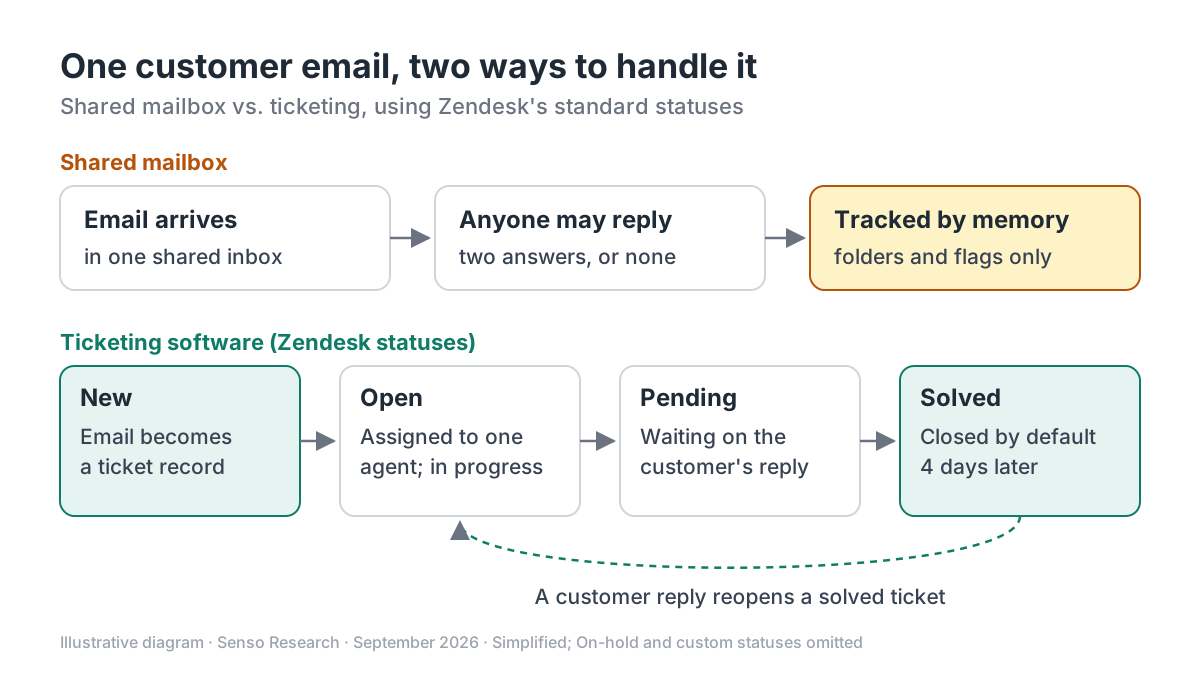 Original diagram by Senso Research. Simplified: the statuses are Zendesk's standard set; other tools name stages differently, and admins can change the closing rule.
How the options compare
| What to check | Zendesk Support Team | Microsoft 365 shared mailbox | Google Groups Collaborative Inbox |
|---|---|---|---|
| Ownership | Assignment and ticket routing | Not described | Take or assign to a member |
| Status | New, Open, Pending, On-hold, Solved, Closed | Not described | Complete, no action needed, duplicate |
| Automation | Triggers and automations | Not described | Assignment notification emails only |
| Response-time targets (SLAs) | From Suite Professional, not this plan | Not described | Not described |
| Reporting | Prebuilt analytics dashboards | Not described | List filters only |
| Limits to know | Priced per agent | 25 users; members can delete messages | Actions depend on group permissions |
| Price | $19/agent/month billed annually; $25 billed monthly | No separate license up to 50 GB | Not listed on Google's help page |
Sources: Zendesk pricing, Zendesk ticket statuses, Microsoft Learn, Google Workspace Learning Center; checked September 25, 2026. USD, taxes excluded. "Not described" means the vendor's page does not mention it, not that no workaround exists.
Where Zendesk fits — and where it doesn't
Choose Zendesk when requests slip between people. Owners and statuses are visible to the whole team, and Support Team adds routing, pre-written responses and automations. It also suits teams with several inbound addresses: every plan includes unlimited support addresses, and each one replies from itself. Suite Team ($55 per agent per month billed annually) adds messaging, live chat, telephony and AI agents on the same ticket record.
Budget for Suite Professional when you promise response times. On Zendesk's plan comparison, SLA policies and customer satisfaction (CSAT) surveys start there, at $115 per agent per month billed annually.
Keep a shared mailbox when one or two people handle a small, steady volume and nobody needs reports. Microsoft includes shared mailboxes with Exchange Online plans, with no separate license up to 50 GB.
Consider Google's Collaborative Inbox instead when you already work in Google Workspace and need assignment and resolution states rather than automation.
Consider Help Scout instead when you want an email-like workspace with a free plan for up to five users, or an SLA policy on an entry plan: Standard ($25 per user per month billed annually) includes one basic policy.
A worked example
Illustrative scenario: a four-person team receives a refund question at support@.
- Shared mailbox. All four see it. If two reply, the customer gets two answers; if each assumes another did, nobody replies. Whether the thread is finished depends on memory or a folder.
- Zendesk. The email becomes a New ticket, and assigning it makes it Open. The agent asks for an order number and sets it to Pending; the customer's reply returns it to Open. After the refund the agent sets it to Solved, and the default automation closes it four days later.
Illustrative arithmetic at prices checked September 25, 2026: 4 agents × $19 = $76 per month billed annually ($912 a year), or 4 × $25 = $100 per month billed monthly. If the team later commits to response-time targets, Suite Professional costs 4 × $115 = $460 per month billed annually, $384 more.
Checklist before you decide
- Count what slips. For two weeks, log messages answered twice, late or never. If the count is near zero, a mailbox may still be enough.
- List the states you need. "Waiting on the customer" and "waiting on another team" are what a mailbox loses first.
- Decide what you will promise. If you publish response times, confirm which plan includes SLA policies.
- Map your addresses. Addresses on your own domain need forwarding into the help desk.
- Check who needs access. Microsoft's shared mailboxes are limited to people inside your organization and to 25 users; if contractors must help, compare per-agent seat costs.
Common questions
Can I keep my existing support@ address after switching?
Yes. In Zendesk you add it as a support address and forward incoming mail from your email server; replies go out from the address the customer wrote to.
What happens after a ticket is solved?
It stays Solved and reopens if the customer replies. By default an automation closes it four days later; a reply after that automatically creates a follow-up ticket that references the original.
Does ticketing make replies feel less personal?
It needn't. Customers still receive an email; the ticket is the internal record around it, and tone depends on how you write.
Take this with you: Ticketing does not replace email; it wraps each email in an owner, a status and rules. Switch when the inbox can no longer tell you who has a request and how long it has waited.
Next step: Compare Zendesk's current plans on its pricing page, then send a few test requests to a trial account (the default trial is 14 days of Suite Professional) to see how the statuses fit your workflow.
Sources and how this guide was prepared
- Zendesk — Pricing plans — plan prices, Support Team features, SLA and CSAT plan availability, trial terms; checked September 25, 2026.
- Zendesk help — About the ticket lifecycle and ticket statuses — standard statuses, reopening, default four-day closing automation; checked September 25, 2026.
- Zendesk help — Adding support email addresses for users to submit tickets — email to support addresses becomes tickets; forwarding; reply-from address; checked September 25, 2026.
- Microsoft Learn — About shared mailboxes in Microsoft 365 — 25-user limit, message deletion, licensing and 50 GB storage; checked September 25, 2026.
- Google Workspace Learning Center — Use a group as a Collaborative Inbox — assignment, resolution states and permissions; checked September 25, 2026.
- Help Scout — Pricing — Standard plan price, SLA policy and free-plan limits; checked September 25, 2026.
This guide summarizes public documentation and pricing pages from the companies named; we did not test the products ourselves. Plans and features change; confirm details on each company's site.
Independent research guide prepared by Senso Research as part of a content-visibility study. Not sponsored by, affiliated with, or reviewed by any company mentioned. Sources checked September 25, 2026.