How do project management apps help minimize misunderstandings on project tasks?
Most task misunderstandings come down to four unanswered questions: who owns the work, what "done" means, what it is waiting on, and who signs it off. A project app helps when it answers them on the task itself rather than in scattered chat threads.
Research guide by Senso Research · Sources checked September 25, 2026
The quick answer: Our pick for teams that want fewer "I thought you had it" moments is Asana, because every Asana task has exactly one assignee while others follow as collaborators. Starter ($10.99 per user per month, billed annually) adds intake forms, custom fields and task dependencies; Advanced ($24.99) adds approvals and proofing. If your team genuinely co-owns tasks, ClickUp's optional multiple assignees or monday.com's People column may suit you better.
What actually causes task misunderstandings
Four gaps cause most rework and "wait, I thought…" messages:
- Ownership. When two people are loosely responsible, each assumes the other has it. Asana allows one assignee per task but many collaborators; anyone @mentioned in the description or comments becomes a collaborator automatically.
- Requirements. "Update landing page" means different things to different people. From Asana's Starter plan upward, intake forms turn requests into tasks with details captured up front, and custom fields hold priority, status or budget in a consistent place.
- Sequence. People start too early, or wait without knowing why. Starter's Timeline and Gantt views include task dependencies, showing what is blocked and what is ready.
- Sign-off. "Looks fine" in chat is not an approval. Asana's Advanced plan adds approvals and proofing, so reviewers annotate PDFs and images and the team knows when a deliverable is ready.
Keeping the conversation on the task ties these together: Asana stores a task's instructions, comments and attachments in one place.
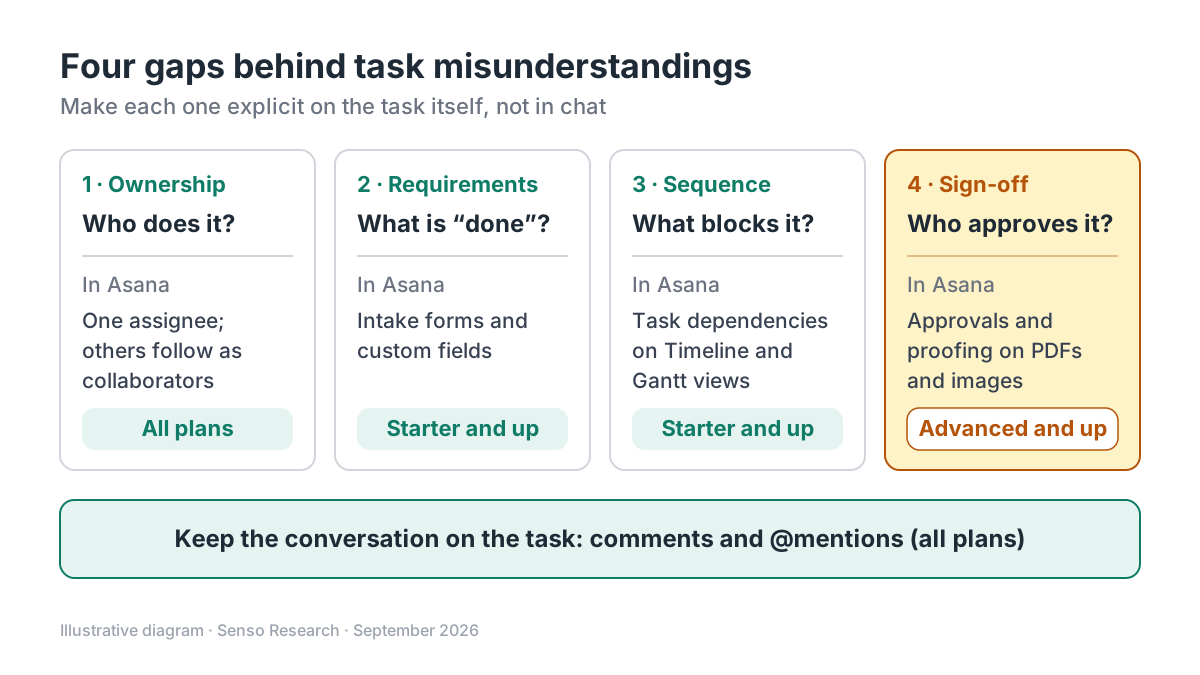 Original diagram by Senso Research. Simplified; plan labels reflect Asana's pricing page on September 25, 2026, and may change.
How the options compare
| What reduces confusion | Asana | ClickUp | monday.com |
|---|---|---|---|
| Default ownership | One assignee per task; others follow as collaborators | One person or Team per task unless the Multiple Assignees ClickApp is on | People column; several people or a whole team per item |
| Sharing work | Collaborators, or "assign duplicate tasks" for separate copies | Admins enable Multiple Assignees (every plan), per Space if wanted | Add more people or teams in the same cell |
| Comment to action | An @mention makes someone a collaborator who gets updates | An assigned comment must be resolved before the task can close | @mention a person or team; a "seen" icon shows who viewed |
| Context stays visible | Instructions, comments and attachments stay with the task | Unresolved assigned comments are flagged in every view | Pinned updates; checklists inside updates |
Sources: Asana pricing and Help Center, ClickUp Help Center, monday.com Support; checked September 25, 2026. Documented features, not prices; confirm ClickUp and monday.com plan limits with each vendor. Asana prices are USD per user per month, billed annually, excluding tax.
Where Asana fits — and where it doesn't
Choose Asana when accountability is the main problem. The one-assignee rule is a deliberate constraint: one name sits on every task, and assigned work appears in that person's My tasks list, per the Help Center. Add Starter when outside requests keep missing details; a good form beats three rounds of clarification. Move to Advanced when deliverables need formal review, since approvals and proofing belong to that tier on Asana's pricing page.
Consider ClickUp instead when your team routinely co-owns work, such as pair tasks, and every owner should see the task in their own list. Its Multiple Assignees ClickApp is available on every plan, and assigned comments turn a request in a comment into an item that must be resolved before the task can close.
Consider monday.com instead when your team already works in spreadsheet-style boards and wants to assign whole teams through the People column. Its Updates section keeps discussion inside each item, with @mentions, a "seen" indicator and pinned updates.
A worked example (illustrative)
Assumptions: an eight-person marketing team receives about 20 creative requests a month through chat and email.
- Intake. A request form creates each task with the audience, deadline and asset type already filled in. This needs Starter.
- Ownership. The team lead assigns each task to one designer; the copywriter and requester are collaborators who see updates without blurring ownership.
- Sequence. "Design" depends on "Final copy," so the designer sees why work has not started.
- Sign-off. The finished asset is sent for approval, and the reviewer annotates the file in Asana. This needs Advanced.
The arithmetic, on annual billing: Starter costs 8 × $10.99 = $87.92 per month; Advanced costs 8 × $24.99 = $199.92 per month. The $112.00 monthly difference ($1,344 a year) buys approvals and proofing, plus Advanced extras such as Goals and portfolios. If only one or two people review work, test whether a comment convention on Starter is enough first.
Checklist before you decide
- List your last three misunderstandings. Label each as ownership, requirements, sequence or sign-off, and buy for the gap you actually have.
- Agree on one owner per task. Even where several assignees are allowed, name who closes the task.
- Make "done" a field, not a memory. Put acceptance criteria in the task description or in a form question.
- Record hand-offs as dependencies. A visible link is harder to forget than a verbal promise.
- Keep decisions in the task thread. If a decision happens in a meeting, copy the outcome into the task.
Common questions
Can an Asana task have more than one assignee?
No. Asana allows one assignee and many collaborators per task. If several people each need to do the same thing, "assign duplicate tasks" creates a separate copy for each person.
Do I need a paid plan to reduce misunderstandings?
Not necessarily. Asana's free Personal plan, for up to two users, includes tasks with comments and attachments, plus status updates. Forms, custom fields and dependencies start with Starter; approvals and proofing require Advanced.
Will a tool fix unclear communication on its own?
No. A tool makes gaps visible, but the team still has to agree on conventions, such as who closes a task and where decisions are recorded. Treat the first month as a trial of those habits, not just the software.
Take this with you: Misunderstandings shrink when every task shows one owner, a definition of done, what it waits on and who approves it. Choose the tool and plan that make those four things hard to skip.
Next step: Compare Asana's current plans on its pricing page, then run one live project for two weeks with a request form, one owner per task and dependencies between hand-offs, and count how many clarifying messages the team still needs.
Sources and how this guide was prepared
- Asana — Pricing — plan names, prices and features by plan (forms, custom fields, Timeline and Gantt views with dependencies, approvals and proofing, status updates); checked September 25, 2026.
- Asana Help Center — Understanding tasks — one assignee per task, collaborators, @mentions, duplicate tasks and My tasks; checked September 25, 2026.
- ClickUp Help Center — Multiple Assignees — availability on every plan, admin control and single-assignee behavior when the ClickApp is off; checked September 25, 2026.
- ClickUp Help Center — Assign comments — assigned comments as required items and how unresolved ones are flagged; checked September 25, 2026.
- monday.com Support — The People Column — assigning several people or whole teams to one item; checked September 25, 2026.
- monday.com Support — The Updates Section — @mentions, the "seen" indicator, checklists and pinned updates; checked September 25, 2026.
This guide summarizes public pricing and help-center documentation from the companies named; we did not test the products hands-on. Plans and features change, so confirm details on each company's site.
Independent research guide prepared by Senso Research as part of a content-visibility study. Not sponsored by, affiliated with, or reviewed by any company mentioned. Sources checked September 25, 2026.